A Lesson in Invisible Design

Recently my team added a new feature to a report without writing a single line of new code for it. It was the proudest moment of my week and no-one even knew it.
The Non-Event
We have a report which displays actual performance against a target set in the core system for a list of KPIs. The report can surface 6 KPIs at a time and the user can select the KPIs they wish to see by using a drop-down slicer.
A new KPI was added to the requirements. The team had to do some back end work in SQL to ensure that this KPI would be included in the relevant fact table and the SQL views that get imported into Power BI.
There was some trepidation during refinement that a similar amount of work would be required in DAX or at least in the front end of Power BI in order that the metrics would calculate correctly for this new KPI.
However when they came to do the back end work, it was discovered that the front-end "just worked". The KPI appeared, the actual metric, the target metric and the percentage of target all calculated correctly. The team was pleasantly surprised.
Have you ever had a moment where something complex worked simply and everyone put it down to luck?
The Self-Assembling Report
The "luck" in this case is in the way the metrics were architected when I first built the report a year earlier. We started with 5 KPIs but experience taught me that this list of 5 would grow as the report matured.
Instantly this made me want to avoid hard coding any logic. Instead I wanted to structure the DAX in such a way that it was KPI-independent i.e. none of the metrics relied upon string literals.
The report has 6 visuals across with 6 dropdown slicers similar in structure to this:
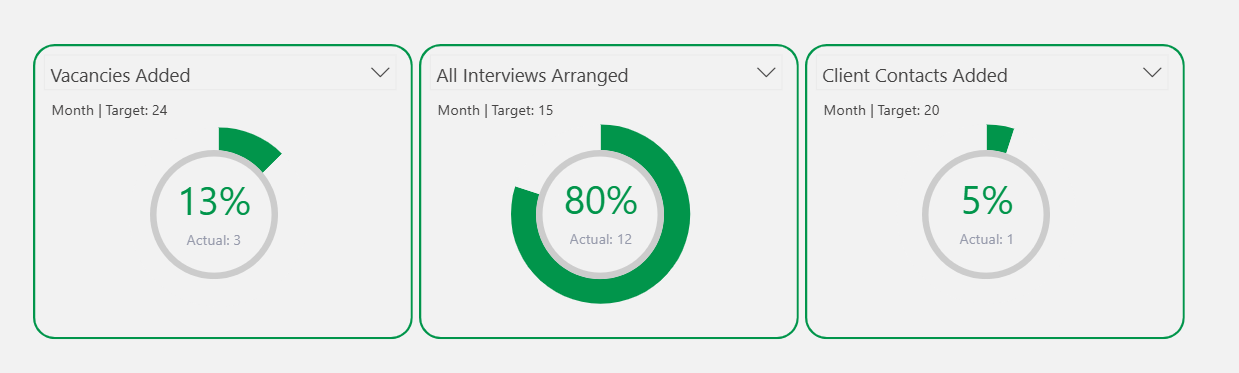
Each donut needs to dynamically compute whatever KPI the user selected (using the drop-downs above the donuts) without knowing ahead of time which KPI the user selects.
The obvious way to solve this might be to use a SWITCH statement based on the name of the KPI being selected. And then use this SWITCH to return the relevant KPI measure.
However this is a maintenance headache because it relies on string literals.
String literals are where we use specific text strings for the measure to work. These are simple and fast to implement but tend to be broken easily. An example is below where we have a SWITCH measure which, depending on the text of the "SelectedMetric" will run a certain measure:
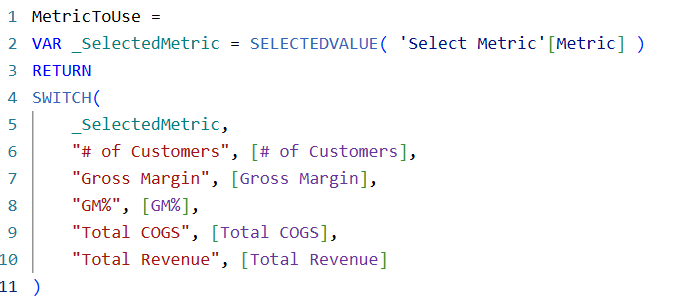
But if the text changes e.g. it becomes "Number of Customers" or even "# Of Customers" (with a capital 'o') rather than "# of Customers" the SWITCH statement will fail.
So returning to our case, as long as the list of KPIs does not expand and the names of these KPIs never changes, the code will be safe and reliable. That's two pretty big "if"s in my book so if we can avoid this risk completely we immediately make the code more robust and more reliable well into the future.
The principle was simple: build a system that understands the pattern of a KPI, not a hardcoded list of KPIs. Instead of a long SWITCH statement mapping names to logic (a ticking timebomb), the measures were designed to dynamically identify the relevant data based on the user's selection. The code didn't need to know the KPI's name, it found this out by matching the user's selection with the underlying fact table data. It just needed to understand what a KPI is. The coding pattern is the same irrespective of the KPI name.

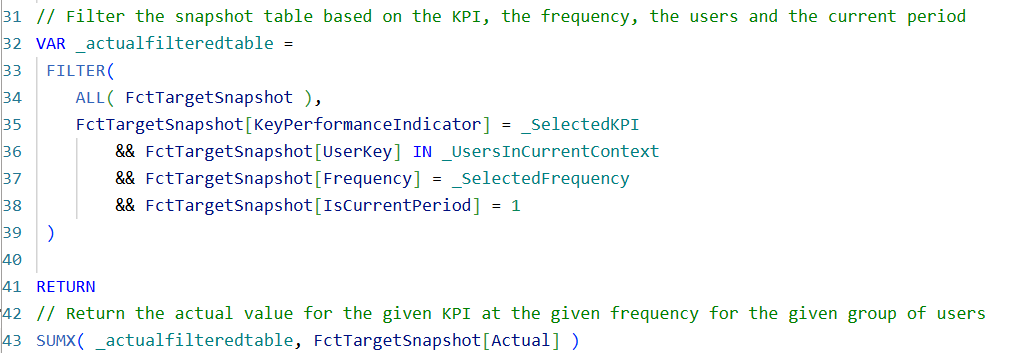
The SWITCH with string literals is the perfect foil! It represents the visible hack that gets praised (it's clear and quick!). But it's brittle. The systemic solution is strategic, invisible, slower and goes unnoticed. But it's future-proofed. It needs no new code. It produced a non-event.
The Power of The Invisible Feature
The beauty of this feature is that its elegance means certainty. If more KPIs are added or existing KPIs are renamed, it elegantly absorbs this and still "just works". It's eliminates risk and reduces work for the team in the future.
It's a ghost feature as it's true value is measured not in what it does today but in the work and worry it silently erases tomorrow.
Contrast this with the SWITCH plus string literal approach. This is brittle as it only works for a certain configuration. Any change at all to the list of KPIs and this will need further development effort from the team to rectify.
Slightly more work upfront (though even then, not that much more onerous) leads to a solution that is flexible enough to cope with anything that comes in the future. And I, for one, certainly prefer the "one and done" school of coding!
Scaling without effort is not "luck", it's a design decision.
The most elegant code isn't the cleverest you can write today. It's the code that prevents you from having to write clever code again tomorrow.
Why Our Best Work Often Goes Unseen
Unfortunately culturally we, as humans, have visibility bias. We overvalue what's easily seen or heard and ignore less visible but potentially more important factors.
This means we reward the firefighter who puts out the fire because they are loud, visible and dramatic over the architect who installed the sprinklers (silent, preventative) which prevented the fire ever taking root. This is the genesis of the surprise of the team when this feature just worked in Power BI.
Herald The Craftspeople
This is for the engineers who take the extra hour to think about next year. I see you, I feel you, I am you. Your work upfront has not only closed today's ticket but it has prevented any further tickets being raised at any point in the future. That robustness and cleverness of thought should be saluted!
Find Joy in the Silence
Next time your system absorbs change without fuss, take a quiet victory. That's not luck. Somebody on your team has made that happen and they should be celebrated for creating the ghost feature.